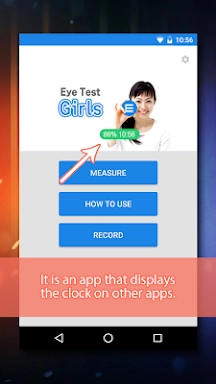
Overlay Digital Clock is a sleek, transparent desktop utility designed to keep you on schedule without cluttering your screen. Engineered to float gracefully above other windows, it allows you to monitor the time effortlessly while staying focused on your work. This app strikes an ideal balance between functionality and subtlety, providing essential details like current time, date, and adjustable transparency levels. It is the perfect solution for users seeking a discreet yet always-visible clock.
Key Features of Overlay Digital Clock:
- Customizable Layout: Users can freely drag and position the clock widget anywhere on their desktop, offering complete flexibility to tailor its placement to individual preferences and workflow needs.
- Built-in Timer: The integrated timer feature operates seamlessly in the background, helping users track intervals efficiently and maintain organization throughout their daily tasks.
- Battery Status Indicator: Display remaining battery life directly within the app interface, ensuring you are always aware of your device's power levels while using the tool.
- Persistent Position Memory: Save your preferred clock location so it appears exactly where you left off every time you launch the application, saving you the hassle of repositioning it daily.
User Tips for Best Experience:
- Experiment with Layouts: Try various positioning options to discover the most comfortable and unobtrusive placement that suits your visual preferences.
- Boost Productivity with Timers: Utilize the timer function to manage task durations, helping you stay focused and maintain a steady pace throughout the day.
- Keep an Eye on Power Levels: Regularly check the battery indicator displayed in the app to ensure uninterrupted usage when needed most.
How to Use Overlay Digital Clock:
- Download & Install: Obtain the application from your device's official app store or visit our website for direct download and installation.
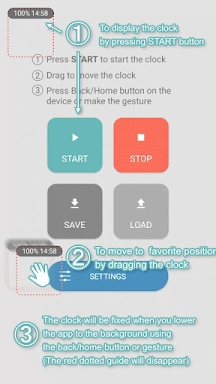
- Launch Application: Open the software, which will automatically render a transparent clock overlay on your desktop upon startup.
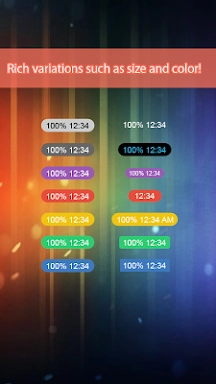
- Adjust Settings: Navigate to the settings menu to personalize the clock’s aesthetics, including font style, color scheme, and opacity levels.
- Set Position: Click and drag the widget to any corner or area of your screen where it remains easily visible without obstructing content.
- Enable 'Always on Top': Activate this feature in the settings to ensure the clock stays above all other open windows at all times.
- Quick Time Check: Glance at the overlay whenever needed, eliminating the need to switch applications or unlock another device just to check the time.
- Update Preferences: Return to the settings menu anytime you wish to modify the appearance, size, or position of your clock widget.
- Troubleshooting Guide: If the clock fails to appear or acts erratically, refer to the in-app help section or reach out to our support team for assistance.
標籤 : 壁紙